Home
/Blog
/Best 3D Printer For Beginner 2026: Complete Guide
Best 3D Printer For Beginner 2026: Complete Guide
We reviewed best 3D printers beginner in 2026 and calculated the true first-year cost. Learn about how much a printer, filaments, upgrades, and failures can cost you in one year.
 Neha Madhavi
As a beginner, best 3D printer will be the one that stands for your needs. In our eyes, the best 3D printer for beginner is Elegoo Centauri Carbon. Because it is affordable and easy to setup under 30 minutes. Other best 3D printers are Bambu Lab A1, Flashforge Adventurer 5M Pro, Creality Ender 3 V3 SE, Anycubic Kobra, and QIDI Q1 Pro. After selecting the best printer, don't forget to apply coupon codes for additional discounts.
As a beginner, best 3D printer will be the one that stands for your needs. In our eyes, the best 3D printer for beginner is Elegoo Centauri Carbon. Because it is affordable and easy to setup under 30 minutes. Other best 3D printers are Bambu Lab A1, Flashforge Adventurer 5M Pro, Creality Ender 3 V3 SE, Anycubic Kobra, and QIDI Q1 Pro. After selecting the best printer, don't forget to apply coupon codes for additional discounts.
Best 3D Printer for Beginners in 2026: The Complete Guide (With Real First-Year Costs)
As a beginner, buying your first 3D printer feels exciting until you literally start searching. One website tells you to buy the cheapest printer out there. While others suggest buying one out of your budget.
After some efforts, when you finally select the one, you find reviews about failed prints, complicated setup, and suggestions of buying after a few weeks for upgraded technology. And confusion hit you like never before.
The fact is most beginners don't quit 3D printing because it's difficult. It is because they fail to buy the suitable printer for their needs. Because, if your printer needs constant adjustments, produces inconsistent results, or needs an extra budget, any beginner will get frustrated.
But don't let these negative things make you quit your hobby, you just need the right assistance as a beginner to buy and start 3D printing with the right printer. So, we took this step ahead to build this 3D printer buying guide specifically for beginners.
In this article, you'll find the best 3D printers for beginners in 2026, including the easiest models to setup, and the best budget options under $400, along with the printers that'll give you more value over time.
Here, we also break down the real first-year cost of owning a 3D printer to help you set an overall budget apart from the machine.
This guide will help you buy what you want depending on your needs. The prices mentioned in this article are verified in Jun 2026. And we absolutely don't list the sponsored picks.
So, take a deep breath and get ready to find the best 3D printer that'll suit your budget, space, and goals without wasting money on features you don't need.
Before You Buy: A Quick Check
Before we start comparing specs and features, let's take a minute to answer the following questions.
Most beginners regret their 3D printer purchase because the printer doesn't match their budget, space, or expectations.
This checkpoint will help you identify your needs and choose the type of printer you want before you spend a dollar.
| Question | If Yes | If No |
| Do you know what you want to print? | Keep reading. You'll be able to select the right printer according to your projects. | Read our "What Can You Make With a 3D Printer?" guide first. A printer is only useful if you know your needs. |
| Is your space ventilated and do you have a dedicated room or corner? | Any printer on this list can work for you. | Flashforge Adventurer 5M Pro will be the best 3D printer for beginners home USA. Its enclosed design and filtration system make it easier to live with in bedrooms, apartments, and shared spaces. |
| Are you comfortable with minor setup tasks (15-30 minutes)? | Any of the printers below should be fine. | Stick with the Flashforge Adventurer 5M Pro. It offers one of the most beginner-friendly setup experiences. |
| Is your budget under $200? | The Creality Ender 3 V3 SE is the most realistic option for you. | Focus on the $200-$400 printers on list. Printers in this price range provide the best balance of simplicity, speed, and long-term value. |
One more thing don't buy a printer just because it's on sale. The best 3D printer for beginners is not the cheapest one. It's the printer that'll align with your needs and you'll enjoy using it for months. For instance, a printer that costs $100 more will save you dozens of hours in troubleshooting and upgrade costs later.
What Makes a Good Beginner 3D Printer?
When you're buying your first 3D printer, it's easy to get distracted by print speed, touchscreen size, or marketing claims. In reality, a beginner-friendly printer will give you better value if you consider a few practical factors.
Here are the things that matter the most.
1. Auto Bed Leveling (Non-Negotiable):
If a printer doesn't have automatic bed leveling, check for the one that has it. Bed leveling is one of the most common reasons beginners struggle with failed prints. Modern printers can measure and adjust the print surface automatically. This means better first layers and far less frustration. In 2026, auto bed leveling isn't a premium feature, it's a requirement.
2. Enclosed vs Open Frame:
An open-frame printer is fine for beginners who plan to print with PLA or PETG. However, an enclosed printer helps control temperature, reduce noise, and contain fumes. If you're placing your printer in a bedroom, apartment, or shared living space, an enclosed machine is usually worth the extra money.
3. Setup Time and Calibration:
Your first printer should get you printing quickly. Some modern printers take less than 20 minutes to assemble and calibrate. While older designs can take an entire afternoon. The less time you spend adjusting belts, tightening screws, and tweaking settings, the more likely you'll enjoy printing from day one.
4. Slicer Software Quality:
Every 3D printer needs slicer software to turn a model into printable instructions. Good software provides ready-made profiles, clear settings, and reliable results. Poor software creates confusion. As a beginner, it'll need you to experiment with settings you don't understand yet. The best printer for beginners is the one that comes with beginner-friendly software.
5. Community and Support:
Sooner or later, every beginner will have a question regarding the machine or outputs. This is where community support matters. Choose a printer from brand that has active user communities, Facebook groups, Reddit discussions, tutorials, and a responsive customer service. Strong support from brand will ease your troubleshoot, will save you hours of frustration, and will help you solve problems in minutes.
The Hidden Cost For First-Year Nobody Talks About
When buying a 3D printer, you need to consider future costs along with the purchase price.
A printer you bought at $199 can easily end up costing you more than a printer that cost $299 over the period of a year when you consider upgrades, filament costs, failed prints, and replacement parts.
Here we list the estimated spend of an average beginner using around 1 kg of filament per month, occasional failed prints, and the most common upgrades during first year.
| Printer | Price | Typical Upgrades (90 Days) | Filament (12 Months @ 1kg/Month) | Electricity | Failed Print Waste | True Year-1 Cost |
| Elegoo Centauri Carbon | $285 | $0–$20 | $180–$240 | ~$15 | ~$20 | ~$500–$580 |
| Bambu Lab A1 | $339 | $0–$20 | $180–$240 | ~$16 | ~$15 | ~$550–$630 |
| Flashforge Adventurer 5M Pro | $399 | $0 (nozzles included) | $180–$240 | ~$18 | ~$15 | ~$612–$672 |
| Creality Ender 3 V3 SE | $199 | $50–$80 (runout sensor, LED, PEI plate) | $180–$240 | ~$12 | ~$40 | ~$481–$571 |
| Anycubic Kobra 3 | $299 | $0–$30 | $180–$240 | ~$15 | ~$20 | ~$514–$604 |
| QIDI Q1 Pro | $469 | $0 | $200–$260 (specialty filament) | ~$22 | ~$15 | ~$706–$766 |
Above are the estimated costs. Actual cost will vary depending on how often you print and the materials you use.
Verdict: At first, the Creality Ender 3 V3 SE looks like the best budget option. And why wouldn't it be? It's the cheapest printer on this list, available at $199.
But after using it for a few months, beginners notice that it'll start adding costs. A filament runout, a better build plate, improved lighting, and other small improvements will easily cost you $50 to $80. On top of this, many beginners experienced failed prints while learning the machine.
This cost puts the Ender 3 V3 SE and Elegoo Centauri Carbon printers in the same bucket for total one-year ownership costs. The only difference is with Elegoo you'll get built-in features, which is what an actual beginner needs.
So, as a beginner, spending extra $86 for buying Elegoo Centauri Carbon will save future frustrations and help you get smoother experience from day one.
Best Beginner 3D Printers in 2026: Our Top Picks
1. Elegoo Centauri Carbon 3D Printer:
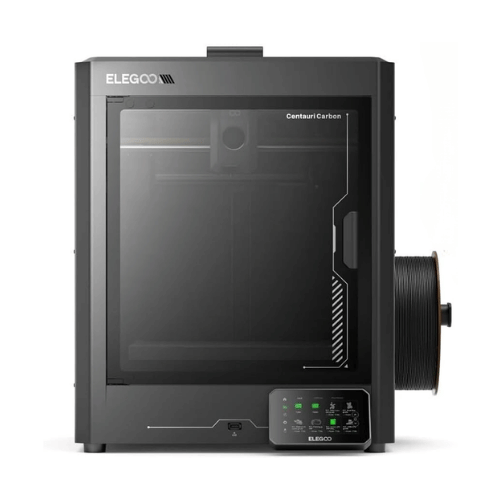
| Purchase Cost | $285 |
| First-year cost | $500 to $580 |
| Setup time | About 20 to 25 minutes |
Elegoo Centauri Carbon is one of the best 3D printers for most beginners in 2026. If you want maximum value without overspending, this printer is made for you.
It also comes with AI chamber camera so you can moderate your printings remotely. They also come with filament run-out sensor, power-loss recovery, and active air filtration to keep your printing experience safe as a beginner.
But this enclosed 3D printer is not made for apartments, bedrooms, or engineering materials.
What we liked:
- Best speed at this price, with performance closer to premium printers.
- Auto calibration and automatic bed leveling reduce beginner mistakes.
- Carbon-fiber compatibility gives you room to grow without buying another printer.
What to watch out for?
- Open-frame design means it's not the quietest option.
- Not ideal for printing ABS or ASA in poorly ventilated rooms.
Now, you can make your first 3D printer purchase more affordable using coupons and deals. If you're buying this Elegoo Centauri Carbon 3D printer, don't forget to use Elegoo coupon code Jun 2026. Using Elegoo coupon, you can get up to 30% discount on 3D printers and up to 45% discount on filaments and more.
2. Flashforge Adventurer 5M Pro 3D Printer:
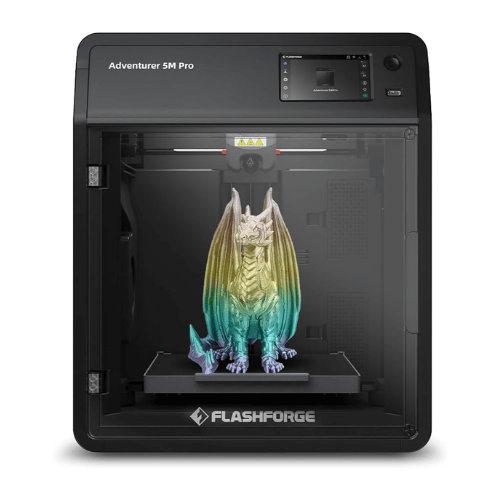
| Price | $399 |
| First-year cost | $612 to $672 |
| Setup time | About 15 minutes |
If you want zero drama and the easiest printer to live with, Flashforge Adventurer 5M Pro 3D printer is made for you. This printer is best for families, apartments, bedrooms, classrooms, and anyone who values simplicity
But if your main goal is to get the lowest cost per print, this Flashforge printer might not be suitable for you.
Check out the detailed comparison of Flashforge Adventurer 5M Pro with Creality K1C.
What we liked:
- Fully enclosed design helps to reduce noise and contains heat.
- Built-in filtration makes it more comfortable for indoor use.
- Most beginner-friendly setup process available today to start with.
What to watch out for?
- Smaller upgrade ecosystem compared to some competitors.
- Costs more than open-frame printers with similar print quality.
They say you need to pay more if you value a quiet, clean, beginner-friendly experience, but not anymore. Now you can buy the convenience of Flashforge Adventurer 5M Pro with additional discounts. Using Flashforge coupon code, you can get up to $100 off on this printer.
3. Bambu Lab A1 3D Printer:
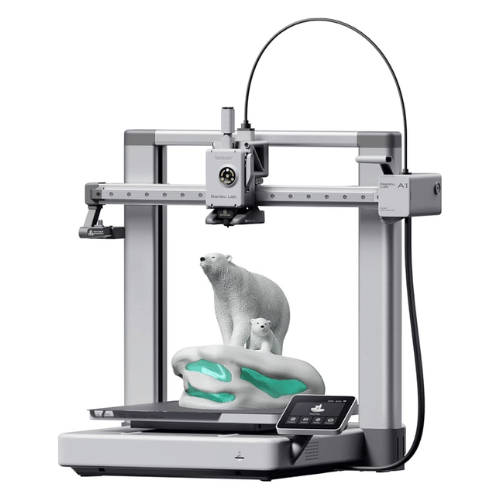
| Price | $339 |
| First-year cost | $550 to $630 |
| Setup time | About 20 minutes |
If you are looking for an easy-to-use 3D printer for reliable printing, Bambu Lab A1 3D printer will be the best choice for you. It is one of the best and most affordable FDM printers for beginners.
This Bambu Lab A1 printer also offers multi-color printing (4 color ecosystem) at a lower price range compared to other brands.
So, if you're looking for real convenience with advanced features, choose Bambu Lab A1.
What we liked:
- Consistently high print quality with very little tuning.
- Excellent and easy-to-learn software ecosystem for beginners.
- Strong community support and troubleshooting resources.
What to watch out for?
- Open-frame design limits some advanced materials.
- Not as affordable as the Elegoo Centauri Carbon when it comes to beginner experience.
Bambu Lab A1 is one of the safest 3 D printer recommendations in 2026.
4. Anycubic Kobra 3 3D Printer:
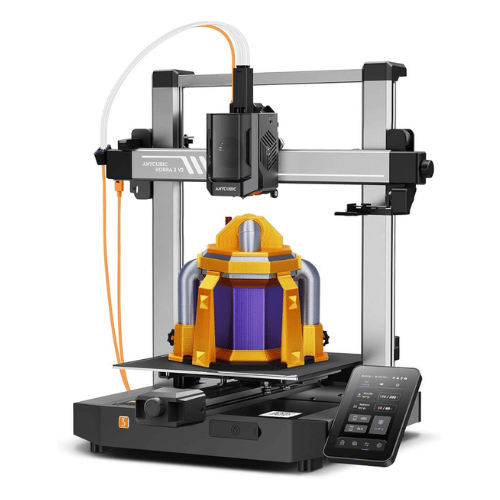
| Price | $299 |
| First-year cost | $514 to $604 |
| Setup time | About 30 minutes |
If you're a beginner looking for a budget-friendly 3D printer with multicolor printing features, the Anycubic Kobra 3 is the best choice for you. With this printer, you can print with up to 8 colors simultaneously, which is best if you're into making miniatures or jewelry.
This Anycubic printer also comes with an active dryer and feeder to prevent print failures. They also come with Failure Prevention Sensors, which means it is safe and convenient to use.
What we liked:
- Attractive pricing for a feature-rich printer.
- Multicolor printing capabilities open up more creative projects.
- Fast enough to keep beginners engaged instead of waiting all day for prints.
What to watch out for?
- Software experience isn't as polished as Bambu's.
- Beginners may need more trial and error when exploring advanced features.
If you want to save money on comfortable, convenient, and feature-packed 3D printers from Anycubic, coupon and discount codes can help you save more. Using Anycubic coupon code, you can get up to $120 off on Kobra series. Prefer buying combos for maximum discounts.
5. Creality Ender 3 V3 SE 3D Printer:
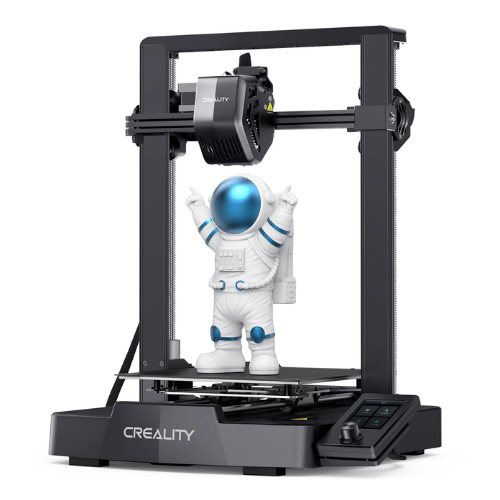
| Price | $199 |
| First-year cost | $481–$571 |
| Setup time | About 30–35 minutes |
Creality Ender 3 V3 SE is one of the best 3D printers under $200. If you're under budget, this printer is a suitable pick for you. It is easy to set up in 20 minutes, as it comes with a pre-assembled modular kit
If you dislike tinkering, upgrades, or troubleshooting, this Creality Ender 3 V3 SE is not made for you.
What we liked:
- One of the lowest-priced 3D printers on the list.
- Huge user community with countless tutorials and upgrades.
- Easy access to spare parts and accessories.
What to watch out for?
- Most owners eventually buy upgrades.
- More failed prints and adjustments compared to premium beginner printers.
None of the 3D printers are that cheap, right? But now you can actually make your 3D printer purchase worth it. Using Creality coupon code, you can get up to 25% discount on your printer purchase. Additionally, if you shop during Creality sale period, you can get up to 50% discount on printer as well as accessories.
6. QIDI Q1 Pro 3D Printer:
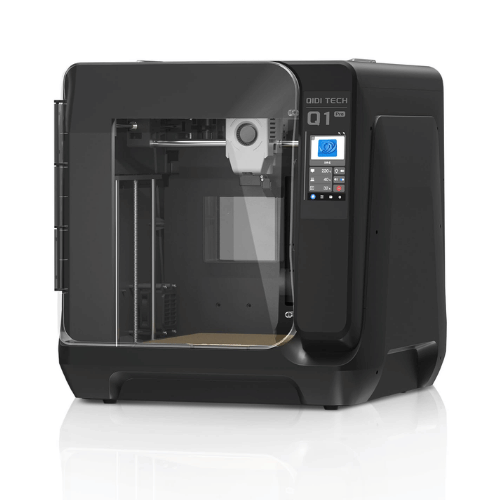
| Price | $499 |
| First-year cost | $706 to $766 |
| Setup time | About 25 minutes |
QIDI Q1 Pro is one of the compact and affordable heated chamber 3D printers. If you're planning to print ABS, ASA, nylon, or carbon-fiber filaments in future, this printer is suitable for you. It also comes with filament runout detection and a tangle detection system.
If you want to print strong, structural materials without paying thousands of dollars, QIDI Q1 Pro 3D Printer is made for you.
But if you're planning to print PLA decorations, toys, and household organizers, you might check other printers in affordable price range as a beginner.
What we liked:
- Enclosed design supports a wider range of materials.
- Strong performance straight out of the box.
- Gives beginners room to grow without upgrading printers later.
What to watch out for?
- Highest ownership cost on this list.
- Many beginners won't use its advanced material capabilities during their first year.
Do you want to make your QIDI printer purchase more reliable for your wallet? If yes, there is no better way than using QIDI coupon codes. QIDI coupons will help you get up to $100 OFF on your purchase. Additionally, if you're shopping from QIDI for the first time, you can get extra 5% off using QIDI first order discount code.
Which Printer From The List Should You Choose?
- If you want a better price range with speed and a beginner-friendly system, choose the Elegoo Centauri Carbon 3D printer.
- If you're going to place your printer in a bedroom, apartment, or shared space, go with Flashforge Adventurer 5M Pro 3D printer.
- If you want clean, beginner-friendly ecosystem with easy to go features, the Bambu Lab A1 3D printer is the best choice for you.
- If you love colors and are looking forward to multicolor printing, buy Anycubic Kobra 3 3D printer.
- If you want a 3D printer under $200, go for the Creality Ender 3 V3 SE 3D printer.
- If you're familiar with the printing materials like ABS, ASA, nylon, or carbon-fiber filaments and gonna use them in future, buy QIDI Q1 Pro 3D printer.
Best Time to Shop For 3D Printer as a Beginner
As a beginner, buying a 3D printer is not less than an investment because even you don't know if this hobby will pay off or just waste your efforts. You might not be sure about how this 3D printer hobby of yours will come out but you can make sure to buy the best 3D printer at lowest price range.
As we learned before, using coupon codes can help you get 10% to 30% discount on your printer purchase. But now you can maximize your savings by shopping at the right time, during the sale season.
Almost every 3D printer brand offers occasional deals for their users. And shopping during these sale periods will help you save more.
Some of the major sales events in USA are Prime Day, Black Friday, Cyber Monday, and New Year sales. During these sales, brands offer maximum discounts of up to 55% on their product range.
Apart from these major sales, brands also offer Clearance sales and Flash sales. To get sale alerts, you can subscribe to SaverMint Newsletter. SaverMint is one of the best smart buyer's platforms in USA. Whether you are shopping for a 3D printer, home appliances, fashion, or beauty products, here you can find genuine saving tips that'll help you save more.
Now cherry on top is you can combine coupon codes with the sale discounts. This way you can double your savings and make your purchase worth every penny.
What to Buy With Your First Printer?
Buying your 3D printer is not enough. You'll also need filaments. Here is what you need to understand about the material types as a beginner.
1. PLA: The Best Filament for Beginners
If you're ordering your first spool today, buy PLA.
PLA is easy to print, affordable, widely available, and works on every printer in this guide. It doesn't require an enclosure, doesn't warp easily, and help you create reliable results with minimum effort.
PLA is perfect for:
- Home organizers
- Desk accessories
- Toys and models
- Decorative items
- Basic replacement parts
2. PETG:
Once you're comfortable with using PLA, try PETG next.
PETG offers better durability, impact resistance, and heat resistance than PLA. It works well for outdoor projects, garage storage, tool holders, and functional household items that need to withstand more wear and tear.
3. ABS and ASA:
ABS and ASA are popular because they're strong, durable, and more resistant to heat and sunlight than PLA.
However, these materials require stable temperatures while printing. That's why, as a beginner, you should only use them on enclosed printers.
What Filament Should You Buy First?
If you're placing your first order, buy
- One spool of PLA in a color you like.
- A second spool of PLA in black, white, or gray for everyday projects.
- Try PETG after you've completed a few successful prints.
There's no need to buy specialty materials right away.
Filament Cost:
One kilogram of filament can last for about a month for small to medium projects.
Here are the price details,
- Standard PLA: $15 to $25 per kg
- Standard PETG: $18 to $30 per kg
- Silk PLA: $25 to $40 per kg
- Wood-fill, metal-fill, and specialty filaments: $40 to $60 per kg
In reality, filaments are cheaper than most people fear. Once you start using 3D printer regularly, you can make more items around your home with filament worth a few dollars.
What to Expect In First Week From Printer As a Beginner?
Many people buy a 3D printer and expect perfect prints from day one. But that's not how 3D printers work.
Even when you buy the best beginner printer in 2026, it'll occasionally produce failed prints or messy first layers. But the good news is, these issues are normal and easy to fix.
Here's what your first week will probably look like.
Day 1:
The first day is all about setup and excitement. Assemble and calibrate your printer and print the test model that comes preloaded on the machine.
Remember, your first print is virtually guaranteed to be imperfect.
Maybe you'll notice small surface lines, corner lifts, or an uneven bottom layer, that's normal. As a beginner, your goal for the first day isn't perfection. It's proving that the printer works and learning the basics.
Days 2 and 3:
Real fun begins from here. Instead of downloading complicated models, start with useful and simple models like desk tray, phone pholder, or drawer divider.
At this stage, you'll learn to download models, use slicer software, change print settings, load and unload filament, and remove prints from the build plate.
As a beginner, don't make the mistake of attempting a 15-hour print before completing several smaller prints.
Days 4 to 7:
Sooner or later, you'll walk into the room and see spaghetti.
You might find a print detached from bed, clogged filament, or a halfway-failed model. But there is nothing to worry about. Every 3D printer beginner has experienced it.
When it happens, don't assume you bought the wrong printer, find the cause. Most of the time prints fail because of dry build plates, incorrect filament settings, poor model orientation, or environmental temperature changes.
Learn to recover from failed prints.
A month later:
After a month, you'll understand if your 3D printer purchase is your genuine hobby or just a passing curiosity.
If you're still browsing model websites, experimenting with new projects, and looking for things around the house to print, you've probably found a hobby.
If that printer is sitting unused in a corner, that's ok too. The best thing is, you can resale it and get 70% to 80% of the purchase value. This will help you recover most of your investment and move on without feeling stuck.
Final Verdict:
So, as a beginner, you don't need to buy or choose the perfect 3D printer. You just need to choose the one that aligns with your budget and needs.
If you're still confused about which model to purchase as beginner, let us know your query in comment section, and we are here to help you.
Get started with your hobby, buy a printer that feels positive, and don't forget to apply valid coupon codes for additional discounts.
FAQs
1. What is the best 3D printer for beginners in 2026?
➜ For most beginners, the Elegoo Centauri Carbon is the best 3D printer. Because of the affordable price, speed, easy usability, and long-term value. If you want to buy simple printer, Flashforge Adventurer 5M Pro is also a strong option.
2. How much does it cost to run a 3D printer per month?
➜ Most of the beginners spend $15 to $25 on filaments per month, because obviously, as a beginner, you won't print that frequently. Electricity can cost you a few dollars, but low compared to filament cost.
3. Do I need an enclosed 3D printer as a beginner?
➜ Not necessarily. As a beginner, printing with PLA and PETG is comfortable. And these filaments work perfectly on open-frame printers. But if you're planning to place your printer in a bedroom, apartment, shared living space, buying an enclosed printer might be the best option for you.
4. Is a 3D printer worth buying for a beginner?
➜ If you enjoy creating, building, organizing, and learning new skills, 3D printer will be suitable for you even as a beginner. Many beginners use their printers for home organization, replacement parts, hobbies, educational projects, and gifts.
5. What filament should a beginner start with?
➜ As a beginner you should start with PLA, because it's affordable, easy to print, nd works on every printer mentioned in this article. So, before experimenting with PETG, ABS, or specialty materials, you should stick with PLA until you feel comfortable with basic printing.
6. Can I make money with a beginner 3D printer?
➜ Yes, you can make money, but don't buy a printer expecting instant income. Even as a beginner, you can sell custom organizers, replacement parts, accessories, decorations, and personalized gifts. But learn your machine thoroughly before expecting income.
7. What is the difference between FDM and resin 3D printing for beginners?
➜ FDM printers use plastic filament and are easy, safe, and clean to use for beginners. Resin printers use liquid resin. They can help you build your products with more details. But they can give you a hard time with cleanup, safety precautions, and post-processing. As a beginner, FDM printer will be the better choice for you. For detailed comparison and product recommendations, check out FDM vs Resin printers comparison.
8. How long does a 3D print take?
➜ Print time depends on the size and the complexity of the model you've decided to print. Small objects can finish printing in 20 to 60 minutes. While complex projects can run overnight to complete.
9. How much filament does a beginner use in a month?
➜ Most beginners use around half kg to 1 kg of filament per month during their first few months. A single 1kg spool is enough for dozens of small projects such as cable organizers, phone stands, storage bins, desk accessories, and replacement parts.
10. What can I make with a 3D printer as a beginner?
➜ As a beginner you can start with phone stands, cable clips, drawer organizers, headphone holders, plant pots, tool organizers, board game accessories, and replacement parts. Start with simple and useful projects to learn the basics.